
Step 1: Notify your Team Lead of your Time Off Request
To help your Team Lead best plan for their department to have coverage on any given day, please get approval from your team lead on the dates/times you’d like to take off first, before submitting a time off request. You can do this by either sending them a Slack message with the details of the request, or you can ask them in person.
It is possible that your time off request could be denied for a variety of reasons. If your Team Lead denies the request and doesn’t provide a reason, please ask them for more clarification.
Once you have received approval from your Team Coordinator, continue to Step 2.
Step 2: Request Time Off in the Workforce App
- Open the Workforce App on your phone.
- Click on the “more” button on the bottom right part of the screen (See Below)
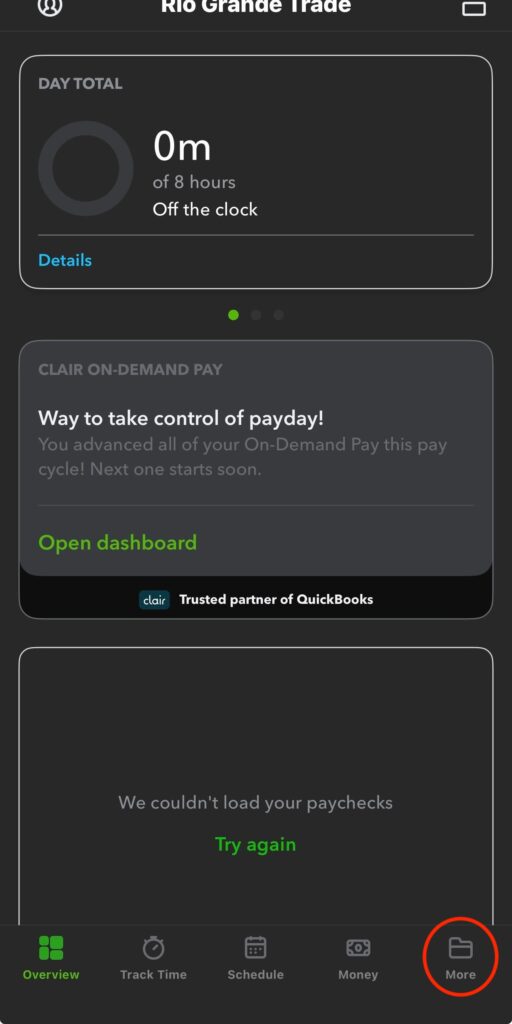
3. A list of options will appear on the next screen, click on “Time Off”
4. A new page will show and in the bottom right hand part of the screen, you’ll see a green clock with a plus symbol. Click on the clock.
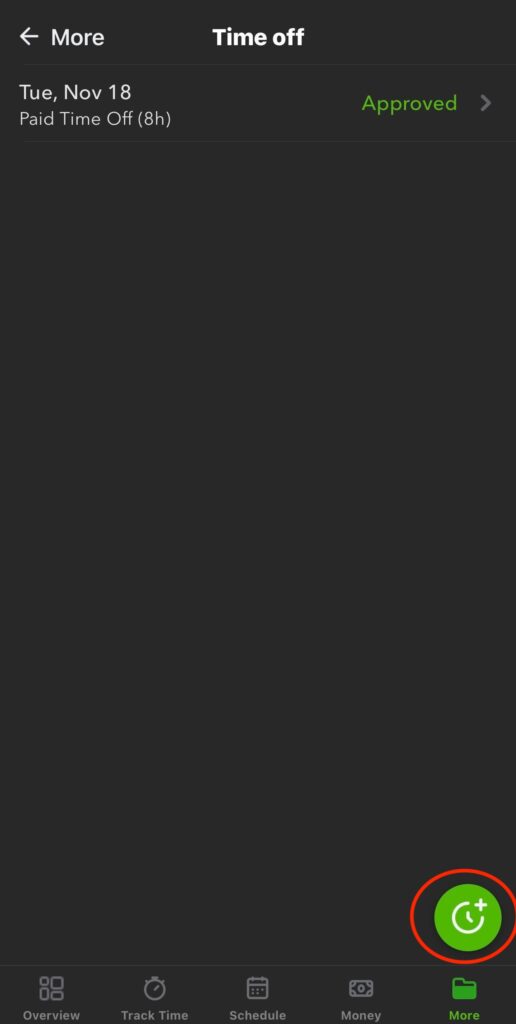
5. Two options will appear on your screen, “Paid Time Off” and “Unpaid Time Off”. Click on the “Paid Time Off” to use your PTO.
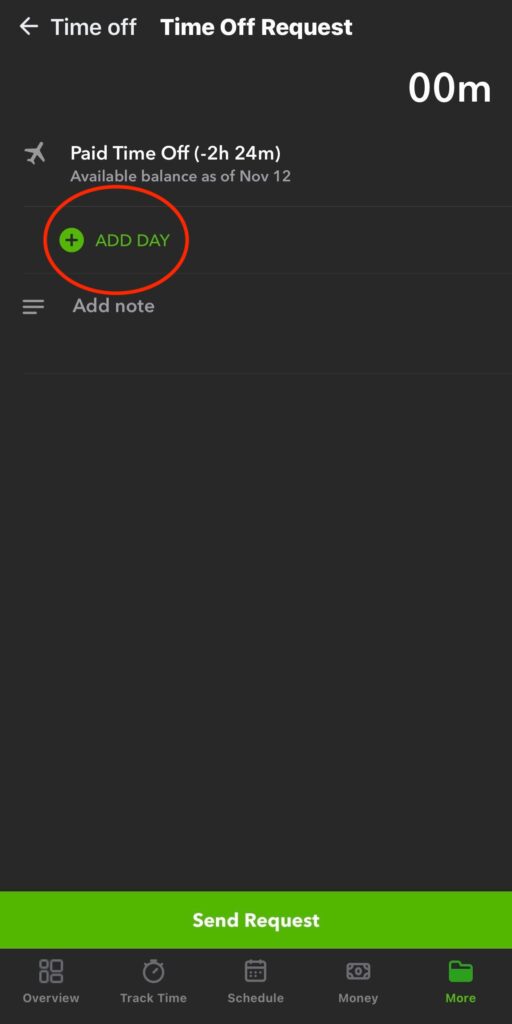
6. Next you will click on “Add Day” and will fill out the appropriate information, click on “send request” to complete your request.
Things to Note:
A few reminders about requesting time off and RGT’s attendance policy:
All time off requests should be made at least three weeks in advance. The earlier the time off request is made, the more likely it is to be approved. Some examples of not requesting time off in advance (which would likely be counted as unexcused absences) include:
- Requesting to leave early on the morning of the day you wish to leave early (same-day request)
- Requesting the day off an hour before your shift starts (same-day request)
- Requesting the following day off at the end of your shift on any given day (less than 24 hours in advance)
Examples of unexcused absences may include (this is not an extensive list; there are other possible unexcused absences as well):
- Arriving more than 7 minutes late to the start of your scheduled shift
- Leaving early from your scheduled shift without prior Team Lead/Management approval
- Any of the above examples of requesting off time less than 24 hours in advance
Examples of excused absences may include (this is not an extensive list; there are other possible excused absences as well):
- Any request that has been approved by your Team Lead (in-person or on Slack) AND Management (through T-Sheets), and was requested more than 24 hours in advance
- Any situation that may be deemed as an emergency, at the discretion of Management
- Any medical situation for which a doctor’s note is obtained
A time off request may be marked as “Approved” in T-Sheets, but that does not always mean it is an excused absence. It may have been marked as approved so that there is a record of the absence, but it may still be an unexcused absence if you have not followed the guidelines for excused/unexcused absences.
Once you have read the entire above article and completely understand it, please fill out this form.